BeeTV: A Complete Guide to Using the App
If you’re searching for a platform to watch your favorite movies and TV shows effortlessly, BeeTV could be just the app you need. In this guide, we’ll explore what BeeTV is, its features, how to use it, and whether it’s the best choice for streaming your favorite content.
BeeTV Overview
What is BeeTV?
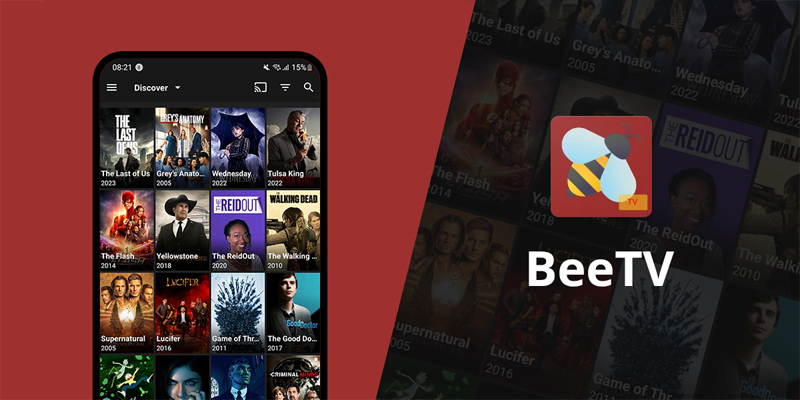
BeeTV is a free, ad-supported streaming application that allows users to stream movies and TV shows on various devices. It offers a broad selection of content, from the latest blockbuster films to classic favorites, making it a top choice for movie enthusiasts.
Instead of hosting its content, BeeTV works by gathering links from multiple external sources across the internet, acting as a search engine for high-quality streaming options. The app’s user-friendly interface ensures that navigating through the vast library of media is simple and enjoyable.
It’s important to note that BeeTV is not an official app. As it provides access to potentially copyrighted content without proper licensing, its use may not be legal in certain regions. Therefore, precautions should be taken when using the app, including considering the use of a VPN (Virtual Private Network) for privacy and security. For a detailed breakdown of the app’s performance, safety features, and long-term usability, read our BeeTV Review.
What are the Features of BeeTV?
-
High-Quality Streaming: BeeTV offers streaming options ranging from SD to Full HD quality. This gives users flexibility in adjusting the stream quality based on their device and internet speed.
-
Crawl-Based: The app functions as a crawler, providing links to movies and TV shows hosted on external servers. This allows users to access high-quality streams from various sources.
-
Extensive Content Library: BeeTV boasts a massive collection of movies and TV shows in various genres and languages, ensuring that there’s something for everyone to enjoy.
-
User-Friendly Interface: BeeTV has a clean and easy-to-navigate interface, allowing users to quickly search for and access their desired content.
-
Offline Downloading: BeeTV enables users to download movies and TV shows for offline viewing, perfect for times when an internet connection is not available.
-
No Login Required: Unlike many other streaming platforms, BeeTV doesn’t require users to log in to enjoy the content. You can start streaming right away, making it quick and easy to use.
Is BeeTV Legal?
BeeTV is legal to install and use as an app, as it does not directly host any content. However, since it links to external servers for media, the legality of streaming specific content may depend on the source of the links. Some of these links might not have the necessary rights to distribute the content, which can lead to potential legal issues in certain regions.
To minimize risks, using BeeTV with a VPN is highly recommended. A VPN can mask your IP address, adding an extra layer of security and privacy while using the app.
How to Download BeeTV on All Devices
How to Install BeeTV on Android TV Box
Follow these steps to install BeeTV on your Android TV Box:
-
Step 1: Turn on your Android TV Box and open the search function on the home screen.
-
Step 2: Search for “Downloader” and select the app from the search results.
-
Step 3: Click “Get” to install the Downloader app and wait for the installation to complete.
-
Step 4: Open the Downloader app and enter the following URL: beetvapk.org/dl-3/.
-
Step 5: Wait for the BeeTV APK to download and then click “Install” once the download finishes.
-
Step 6: After installation, select “Open” to launch BeeTV and start streaming.
Some users prefer to remove ads for a more seamless streaming experience, which is possible through additional tools or settings modifications.
How to Download BeeTV on Firestick
To install BeeTV on your Firestick, follow these instructions:
-
Step 1: From the Firestick home screen, go to “Settings” and then “My Fire TV” or “Device.”
-
Step 2: Enable “Apps from Unknown Sources” in the Developer Options section.
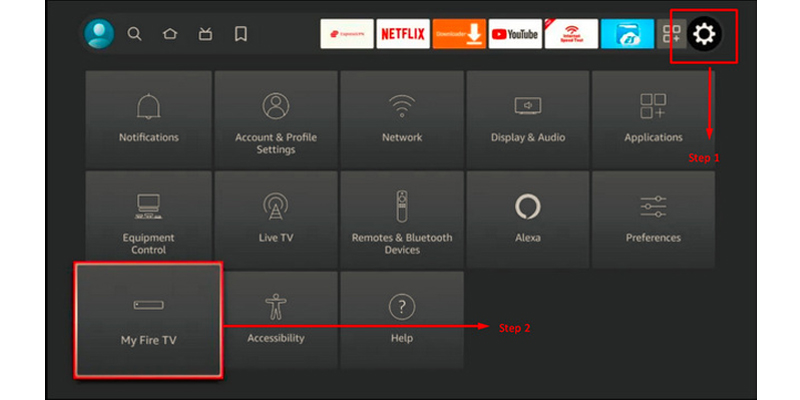
Step-by-step guide for installing BeeTV on Firestick
-
Step 3: Search for and install the “Downloader” app from the search bar.
-
Step 4: Open the Downloader app and enter the URL: beetvapk.me/download/.
-
Step 5: Wait for the download to finish and click “Install.” Once installed, open the app and start streaming your favorite movies and TV shows.
How to Install BeeTV on Roku
Roku devices don’t support the BeeTV app natively. However, you can use screen mirroring to stream BeeTV content from an Android device or PC to your Roku device. This workaround allows you to watch BeeTV on your television.
How to Watch Movies on BeeTV
Once you’ve installed BeeTV, watching movies is simple. Just follow these steps:
-
Step 1: Launch the BeeTV app on your device.
-
Step 2: Search for the movie you wish to watch or browse through the categories.
-
Step 3: Select the movie you want to stream.
-
Step 4: Choose your preferred video quality (SD, HD, or Full HD).
-
Step 5: Pick a streaming link, and the movie will begin playing.
Keep in mind that BeeTV provides links to external servers, and the quality or availability of content may vary.
How to Remove Ads in BeeTV
BeeTV users can eliminate some ads by following these steps:
Solution 1 – Use MX Player:
-
Step 1: Install MX Player Pro.
-
Step 2: In the BeeTV app, open the menu and select “Settings.”
-
Step 3: Set MX Player as the default video player to avoid ads.
Solution 2 – Use the CleanWeb feature in Surfshark VPN:
-
Step 1: Enable Surfshark’s CleanWeb feature to block ads.
-
Step 2: Return to BeeTV and enjoy an ad-free experience.
However, some users have reported continued ads even after using these solutions, depending on updates to the app or ad-blocking methods.
Why is BeeTV Not Working?
If BeeTV isn’t working correctly, there are several possible causes and solutions:
- Server Issues: BeeTV relies on external servers, which can occasionally go offline. If so, try again later.
- App Update: Outdated versions of BeeTV may cause issues. Check for updates to ensure you have the latest version.
- Internet Connection: A slow or unstable connection may affect streaming. Ensure your internet connection is stable.
- Clear Cache: Clear the cache and data to fix performance issues.
Best BeeTV Alternative
While BeeTV is a popular app, it does have ads and potential legal concerns. If you’re seeking a hassle-free, ad-free experience, OnStream is an excellent alternative. OnStream offers a smooth, premium streaming experience without the need for subscriptions or sign-ups, and it features multi-language subtitles and a wide variety of servers.
Why settle for ads when you can enjoy uninterrupted streaming with OnStream?