Top 16 Korean Drama Shorts That Will Hook You Instantly
Apr 21, 2026
TeaTV app is a well-known streaming application for users who want free access to movies and TV shows across multiple devices without traditional subscription fees. Designed as an advanced streaming aggregator, the TeaTV app brings together a high-definition library of global movies and TV series in one convenient place.
In this review, we help you understand who TeaTV is for, how it works, and whether it is worth your time compared to other tea tv apps available today. We also provide film and anime enthusiasts with a transparent look at its core functionality, safety considerations, and installation procedures, especially within the evolving 2026 streaming landscape. Whether you are watching on a mobile device, TV, or Android-based platform, this guide helps you decide if TeaTV app truly matches your entertainment needs.
TeaTV App Overview
The TeaTV app is a third-party movie and TV streaming application designed for users who want on-demand entertainment without paid subscriptions. It does not host content on its own servers. Instead, TeaTV works as a lightweight scraper that scans the public web for available streaming links and presents them through a clean, easy-to-use interface.
We commonly see the app used on Android phones, Android TV, Firestick, and other Android-based devices. Its core focus is simple access to content, flexible playback quality, and optional offline viewing. For film lovers and anime fans, TeaTV offers a broad range of genres, including action, drama, comedy, thriller, horror, animation, and international cinema. The app also pulls detailed metadata from TMDb, such as cast details, trailers, and ratings, to support a smoother and more informed browsing experience.
Before installing any streaming app, it’s important to understand where it works and what your device needs to run it properly. This helps you avoid compatibility issues and ensures a smooth setup.
The table below shows where TeaTV app works, its system requirements, and basic licensing information so you can quickly check if your device is supported.
|
Item |
Details |
|
Application |
TeaTV App |
|
Supported Platforms |
Android phones, Android TV, Android TV boxes, Firestick, Android Smart TVs, Windows/Mac (via emulator), Chromecast |
|
License |
Free |
|
Android Version |
5.0 and above |
|
iOS Support |
Limited (third-party app stores only; not official App Store) |
|
App Size |
13-14 MB (current v11.x); up to 21 MB for older versions |
|
Streaming Quality |
SD, HD, Ultra HD (up to 4K on compatible devices) |
|
Subtitle Support |
50+ languages with customization |
|
Offline Download |
Yes, supported |
|
External Players |
VLC, MX Player, NV Player |
TeaTV app runs smoothly on most Android devices and does not require high-end hardware. This makes it easy to install and use, even for casual users with standard devices.
When we analyze TeaTV’s content, variety clearly stands out as its strongest feature. The app brings together a wide mix of movies and TV shows, making it suitable for different tastes and viewing habits. Users can easily access:
To help users find what they want faster, TeaTV app organizes its library by genre, popularity, and release year. This clear structure reduces search time and makes browsing more comfortable.
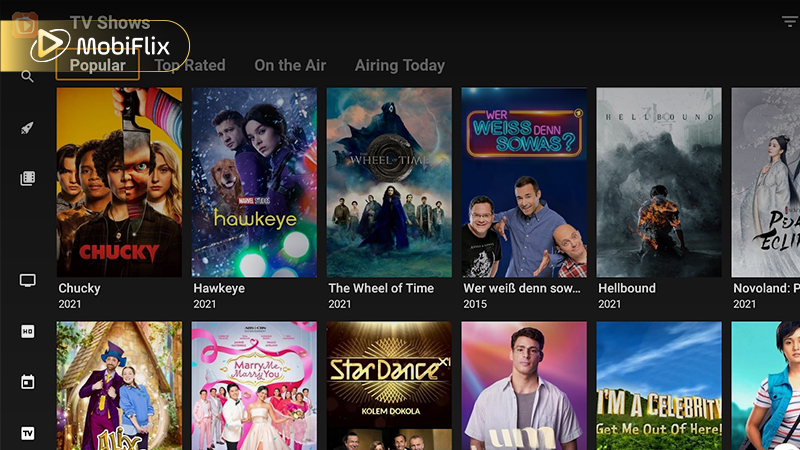
TeaTV Movies & TV Library
When we evaluate the TeaTV app, its longevity in the streaming world comes down to a few standout characteristics. Unlike other TV apps that often feel cluttered or slow, TeaTV focuses on a high-speed, lightweight experience. Whether you are using the TeaTV app for Android or a specialized TV box, these features are designed to make your entertainment life easier.
We have identified the core pillars that make this app a favorite for millions:
Before moving to the navigation guide, it is essential to understand how the TeaTV app handles different hardware. The table below provides a quick look at what you can expect in terms of visual quality.
The following data summarizes the streaming benchmarks for the TeaTV app for Android TV and mobile platforms.
|
Quality Level |
Resolution |
Recommended Hardware |
|
Standard (SD) |
480p |
Older Android phones (v5.0+) |
|
High (HD) |
720p – 1080p |
Standard Firestick / Mid-range phones |
|
Ultra (4K) |
2160p |
Firestick 4K / Shield TV / High-end Tablets |
|
Offline Mode |
Variable |
Depends on available local storage |
Before choosing any streaming app, it’s important to consider both its strengths and limitations. Doing so helps you set realistic expectations and decide whether the app matches your viewing habits. The TeaTV app offers several clear advantages, but it also has a few drawbacks to keep in mind.
Understanding these trade-offs makes it easier to decide ifthe TeaTV app fits your needs.
While the TeaTV app provides incredible convenience, we must emphasize that it operates in a legal grey area. Because it aggregates links to copyrighted content, its use is restricted in many regions.
To protect yourself while using TeaTV app, follow these expert safety protocols:
https://teatv.com.in/wp-content/uploads/2024/12/Feature-images-2.webp
You won’t find TeaTV app on the Google Play Store, so manual installation is required. While this may seem complicated at first, the process is actually straightforward and can be completed in just a few minutes.
To download TeaTV app, follow these steps:
Overall, the installation process is simple and suitable even for non-technical users.
Many users prefer watching movies and TV shows on larger screens for a more immersive experience. TeaTV app for android tv works smoothly on Android TV boxes and Firestick devices, allowing you to enjoy content comfortably on your television.
The table below explains the most common installation methods for TV-based devices, helping you choose the right setup for your device.
|
Device |
Installation Method |
|
Android TV |
APK via browser or file manager |
|
Firestick |
Downloader app + APK |
|
Android TV Box |
Direct APK install |
Once installed, the TeaTV app adapts well to remote controls and widescreen displays. The interface remains easy to navigate, making it ideal for relaxed, home-theater-style viewing on large screens.
Many users search for the TeaTV app for iPhone or TeaTV Apple, but it’s important to set clear expectations. TeaTV does not offer an official iOS version on the Apple App Store. Because of Apple’s platform restrictions, iPhone and iPad users cannot install the app in the same way as Android users.
Some people try third-party methods or web-based alternatives to access TeaTV on iOS, but these options are often limited, unstable, and less reliable. As a result, the overall experience may feel incomplete. For the best performance, full feature access, and long-term usability, TeaTV is primarily recommended for Android-based platforms.
Offline viewing is another key reason many users choose TeaTV app download options. Instead of depending on a constant internet connection, you can save selected movies or TV episodes to your device and watch them later at your convenience.
This feature is especially helpful in common situations such as:
In most cases, downloaded files retain subtitle support and selected quality settings. This ensures a smoother and more enjoyable offline viewing experience with the TeaTV app.
The TeaTV app is designed to be simple and fast. The interface is clean, easy to understand, and works smoothly on both touchscreens and TV remotes. You can browse and start watching content quickly without confusion. Key design features include:
TeaTV also offers useful playback tools that improve everyday viewing:
The app remembers where you stopped watching, making long or binge sessions more comfortable and convenient.
This app is only suitable for a small group of users who clearly understand the risks involved. You may consider using it only if you meet all of the following conditions:
For most users, especially in countries with strict copyright laws, this app is not recommended.
Who Should Consider This App (Limited Audience)
While the TeaTV app works well, many users prefer having backup options in case the service is down or a title is unavailable. In 2026, there are several TeaTV apps and similar platforms that offer a comparable streaming experience.
Popular alternatives include:
Before choosing an app to use alongside your TeaTV app download, it helps to see how they compare.
|
App Name |
Best For |
Top Feature |
Platform Focus |
|
MediaBox HD |
Multi-device users |
Strong iOS support |
Android & iOS |
|
Cinema HD |
High-quality links |
Real-Debrid support |
Android / Firestick |
|
Stremio |
Customization |
Community add-ons |
Windows, Mac, Android |
|
BeeTV |
Ease of use |
Lightweight design |
Android Mobile |
All of these apps work in a similar way by pulling links from third-party sources, so they come with the same legal and security risks. Using more than one option helps ensure you can still stream your favorite content if TeaTV is unavailable.
The TeaTV app is a flexible option for users who want free, no-subscription streaming on Android devices. The app combines a wide range of movies and TV shows with simple navigation and reliable performance, making it suitable for everyday viewing.
If you value convenience, content variety, and device flexibility, and you understand the potential risks, the TeaTV app can be a practical and appealing choice.
TeaTV can experience temporary shutdowns or maintenance periods from time to time. This usually happens due to copyright takedowns, domain changes, or server maintenance. These interruptions are often temporary, and the app typically becomes available again after updates or service adjustments.
Yes, the TeaTV app is free to use. Users can stream movies and TV shows without paying subscription fees. Some versions may include optional features, but the core streaming experience remains free.
Some versions of TeaTV app support offline viewing. This allows you to download movies or TV episodes to your device and watch them later without an internet connection.
Yes, TeaTV includes advertisements, and ad volume has been a common user complaint. Past investigations reported heavy ad loads, which led some users to stop using the app due to frustration. Following these reports, major ad networks ended partnerships with TeaTV over ad fraud concerns. Security researchers have also warned that some ads may contain malicious redirects or fake virus alerts. Users should expect frequent ads and avoid clicking on them to reduce security risks.
A VPN is not required to use TeaTV app, but it can improve privacy and add an extra layer of security while streaming content.

Apr 21, 2026

Apr 21, 2026

Apr 21, 2026

Apr 21, 2026

Apr 09, 2026

Apr 07, 2026