Top 16 Korean Drama Shorts That Will Hook You Instantly
Apr 21, 2026
Titanium TV is still circulating in 2026, popping up in searches from users hoping it works like it used to. The app promises free movies and TV shows in a clean Android interface, but stability and safety remain real concerns. Links break, versions disappear, and questions about legality continue to follow it.
Before installing any APK, you need a clear look at what’s functional today, what’s risky, and what actually delivers consistent streaming.
Titanium TV app overview
Titanium TV is a third-party streaming application designed for on-demand movies and TV shows. It gained popularity as a lightweight Android-based streaming solution after the shutdown of several similar apps in previous years.
Unlike official platforms such as Netflix or Crunchyroll, Titanium TV does not host its own content. Instead, it aggregates streaming links from different sources across the web. Its main audience includes Android users who want free access to films and TV series.
Before installing any APK, we review the core technical and compatibility details that directly affect usability and safety. Below is a general overview of Titanium TV’s file structure and compatibility.
|
Category |
Details |
|
Application Type |
Third-party streaming application |
|
Supported Platforms |
Android OS (mobile & Android TV-based systems) |
|
License |
Unofficial, not licensed for copyrighted distribution |
|
Android Version Required |
Typically Android 5.0 and above |
|
iOS Availability |
Not available on iOS |
|
Installation Method |
Manual APK sideload (not on Google Play) |
|
Download Size |
Approximately 25–35 MB (varies by version) |
|
Streaming Quality |
Depends on available links (SD, HD, sometimes Full HD) |
|
Subtitle Support |
External subtitle integration supported |
|
Offline Download |
No official built-in offline feature |
|
External Player Support |
Compatible with third-party video players (e.g., MX Player, VLC) |
|
Official Website |
No verified official domain |
This overview shows that Titanium TV functions purely as an Android-based sideloaded app with no official licensing or iOS support, which directly impacts safety, legality, and long-term reliability.
Titanium TV focuses primarily on movies and Western TV series. Its content offering depends on third-party link providers, so availability may vary over time. Below is a clear breakdown of what users typically find:
Since Titanium TV does not host content directly, the library is not officially maintained. Titles may disappear, links can break, and streaming quality often depends on the external hosting source.
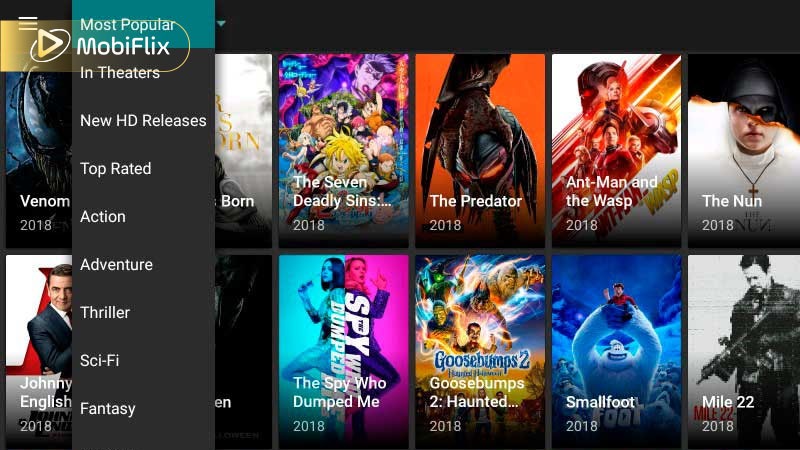
Titanium TV content library
Titanium TV built its user base through simplicity and flexible playback options. Here are the most notable features:
Before moving on, it helps to understand how Titanium TV handles streaming quality. Since the app depends on third-party sources, video performance varies by link and internet speed.
|
Feature |
Performance Detail |
Ideal Connection Speed |
|
Standard Definition (SD) |
480p – Lower data usage |
2–3 Mbps |
|
High Definition (HD) |
720p – Balanced clarity |
5–8 Mbps |
|
Full HD (FHD) |
1080p – Sharper visuals |
10+ Mbps |
|
Link-Based Resolution |
Depends on available source |
Varies |
|
Background Downloading |
Not officially supported |
N/A |
This quality structure means performance depends more on the streaming link than the app itself. Choosing the right resolution for your connection can reduce buffering and improve overall playback stability.
We always evaluate both sides clearly.
Titanium TV appeals to users looking for free access. However, trade-offs include security and reliability concerns.
Safety and legality are the most important topics here.
Legal Perspective: Titanium TV does not hold official streaming licenses. That means it may provide access to copyrighted content without proper distribution rights. Laws vary by country, but streaming copyrighted content from unofficial sources may carry legal consequences.
Is Titanium TV still working? Remember that even if it works technically, that does not mean it operates legally.
Security Risks: Because Titanium TV is installed via APK, you must enable unknown sources. Also, files may come from unverified websites. Some modified versions may contain malware.
Recommendations:
From a trust standpoint, Titanium TV lacks transparency. There is no verified company ownership or official public support channel.
On Android devices, Titanium TV runs smoothly when installed properly. The interface follows a familiar streaming layout, with a home screen organized by categories, a search bar placed at the top, and a poster-style grid displaying available titles.
Selecting a movie or show triggers one-click link fetching, where multiple streaming sources appear. Overall performance depends largely on the quality of those links and your internet speed, so buffering may still happen during peak usage hours.
When installed via APK, Titanium TV behaves slightly differently from official store apps due to Android-level permissions and system flexibility. Key APK-specific aspects include:
These APK-specific behaviors affect maintenance, updates, and long-term stability more than streaming features themselves.
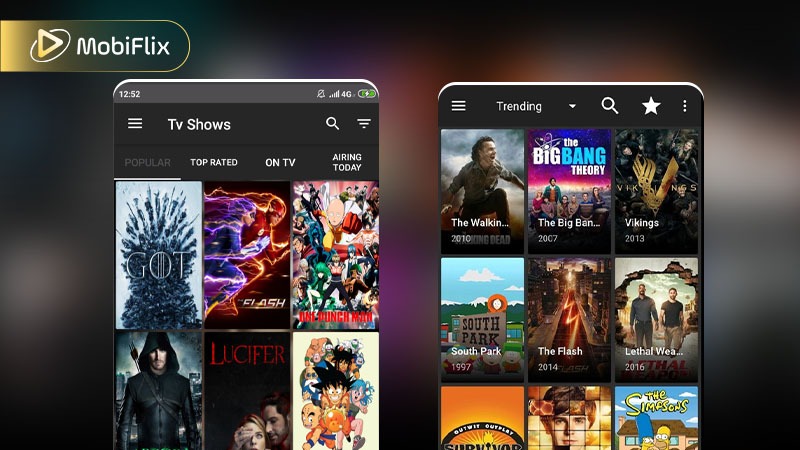
Titanium TV Android interface
We do not promote unsafe downloads, but here is the general process users follow:
Important safety reminders:
Installation always carries risk when bypassing official app stores.
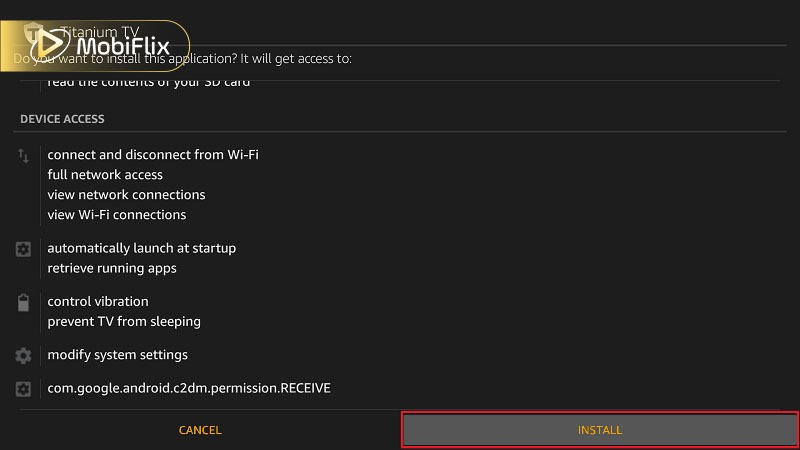
Titanium TV APK installation
Titanium TV works best on large screens, including Android TV OS, Firestick devices, and Samsung-based Android systems.
However, “Samsung Titanium TV” as a built-in Smart TV app does not officially exist. It can only run if the Samsung device supports Android-based sideloading. “Mido Titanium TV” is also often searched online, but there is no verified official brand or partner device under that name.
On Firestick, users typically install Titanium TV using the Downloader app. Navigation works with a remote, though performance depends on device storage and RAM.
The table below outlines the most common installation paths for TV-based devices so you can quickly identify what works for your setup.
|
Device |
Installation Method |
|
Android Smart TV (Android OS) |
Direct APK via browser or USB |
|
Amazon Firestick |
Downloader app + APK sideload |
|
Android TV Box |
Direct APK installation |
|
Samsung Smart TV (Tizen OS) |
Not supported natively |
|
Non-Android Smart TVs |
Requires external Android TV box |
Compatibility depends entirely on whether the device supports Android APK sideloading.
As of 2026, there is no official Titanium TV app available on the Apple App Store. Titanium TV was developed specifically as an Android APK, which is a file format incompatible with Apple’s closed iOS ecosystem.
If you search “Titanium TV” in the App Store, you may find apps with similar names. These are typically unrelated utility tools, file managers, or guide apps. Installing these will not give you access to the Titanium TV streaming interface.
Why You Can’t Find Titanium TV on iOS: Apple maintains strict “Walled Garden” policies regarding app distribution. Because Titanium TV is a third-party aggregator that does not hold official streaming licenses, it fails to meet the App Store’s legal and safety requirements.
Many websites claim to offer “Titanium TV for iOS” or “Titanium TV IPA” files. We strongly advise caution when encountering these sites for the following reasons:
The Best Way to Watch on iOS: If you are an iPhone or iPad user looking for a reliable streaming experience, we recommend using official, licensed alternatives that are optimized for iOS.
Titanium TV’s interface is simple:
Tips for a better experience:
If Titanium TV is not working, try restarting the app or checking link availability.
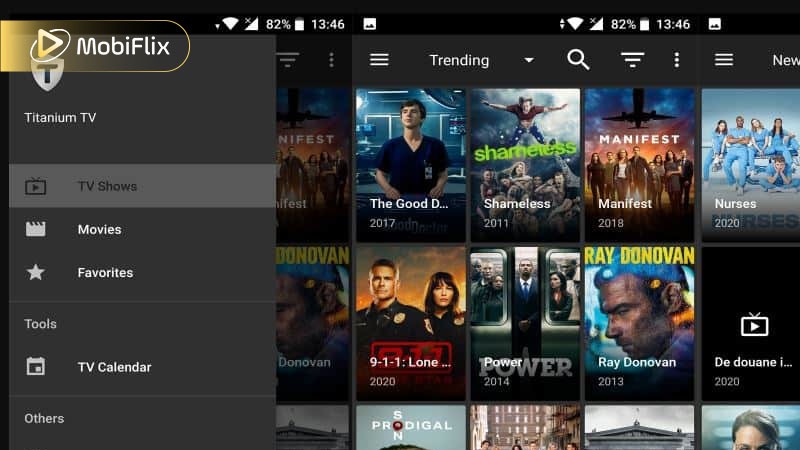
Titanium TV app navigation
If safety and legality matter to you, official platforms offer better reliability. The options below give you a mix of free ad-supported streaming, aggregation tools, and value-focused services so you can choose based on how you like to watch.
|
Service |
Type |
Free or Paid |
Content Highlights |
Key Advantage |
|
Tubi |
Ad-supported streaming |
Free |
Movies, TV shows, documentaries |
No subscription; large catalog |
|
Pluto TV |
Free live + on-demand |
Free |
Live channels + on-demand films |
Combines linear TV & library |
|
Amazon Freevee |
Free ad-supported |
Free |
Thousands of movies & series; live channels |
Works on most devices |
|
Stremio |
Content aggregator |
Free / Add-ons |
Unlimited shows via add-ons |
Centralizes multiple sources |
These options let you enjoy a range of content legally and often at no cost, making them solid replacements for users looking beyond Titanium TV’s unofficial streaming model.
Titanium TV may appeal to Android users seeking free streaming access and who understand the risks involved. It works on Android-based systems, including Firestick, but it carries legal and security concerns.
Titanium TV still appears online in 2026, but its working status and safety remain uncertain. Before installing Titanium TV, weigh convenience against potential risks carefully.
Titanium TV does not officially support built-in offline downloads. Some Android versions may allow external download options, but reliability varies.
Titanium TV has faced shutdown periods in the past due to copyright concerns. Availability depends on server status and developer activity.
Buffering usually happens due to broken links, server overload, outdated APK versions, or slow internet connection.
Some users choose VPN services for privacy. However, a VPN does not make copyrighted streaming legal in all regions.
You may still find APK files online, but there is no verified official source. Always verify file integrity and understand associated risks before installing.

Apr 21, 2026

Apr 21, 2026

Apr 21, 2026
Apr 21, 2026

Apr 09, 2026
Apr 07, 2026